
ANDREW YI / DIGITAL EXPERIENCE CASE STUDY
ATLAS
at ATL
ROLE
Project Design Lead + Digital Experience Project Manager
TIMELINE
December 2025 — June 2, 2026
15 FT
LED SPHERE
CAPITAL SIGNS × HARTSFIELD-JACKSON ATL
Designing a 25-foot-tall immersive media landmark built around a 15-foot LED sphere for the world’s busiest airport.
01 / OVERVIEW
Designing a Spectacle to Welcome Passengers
to Atlanta
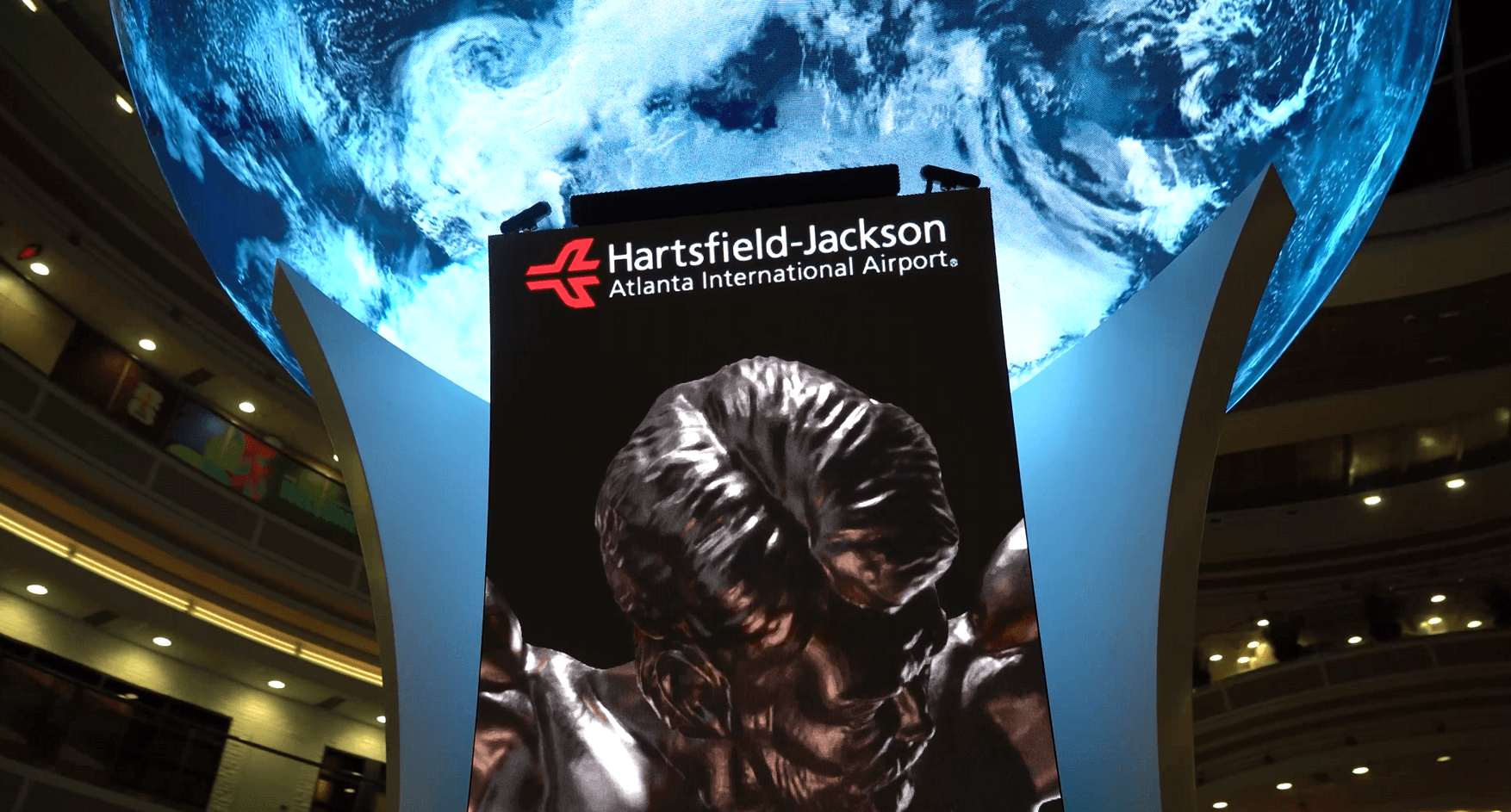
Capital Signs was commissioned by Hartsfield-Jackson Atlanta International Airport to replace the atrium’s original 1993 clock tower with a new digital landmark.
The goal was to create an immersive welcome experience combining large-format media, synchronized playback, spatial audio, and future interaction.

THE SITE / DOMESTIC TERMINAL ATRIUM - LAUNCH DAY
MY ROLE
Project Design Lead + Digital Experience Project Manager
15 FT
LED SPHERE
10M+
PIXELS
8K
SYNCHRONIZED PLAYBACK
$3.26M
PUBLICLY REPORTED INSTALLATION
02 / THE PITCH
A Multidisciplinary Design Project
Building on the original concept of an LED sphere located in the atrium, I created the client-facing materials, from mockups and renderings to the final pitch presentation. I managed the project through design development, and architectural documentation.
LEARNING ON THE GO
I taught myself SolidWorks to create the production-ready drawing package, then learned Blender to produce the final 3D renders.
03 / ARCHITECTURE + ENGINEERING
Turning a digital concept into buildable architecture.
Using SolidWorks, I created the architectural models and drawing package used to communicate ATLAS’s form, internal technology housing, seating, and fabrication intent. Specialist partners produced the LED wiring and electrical diagrams.
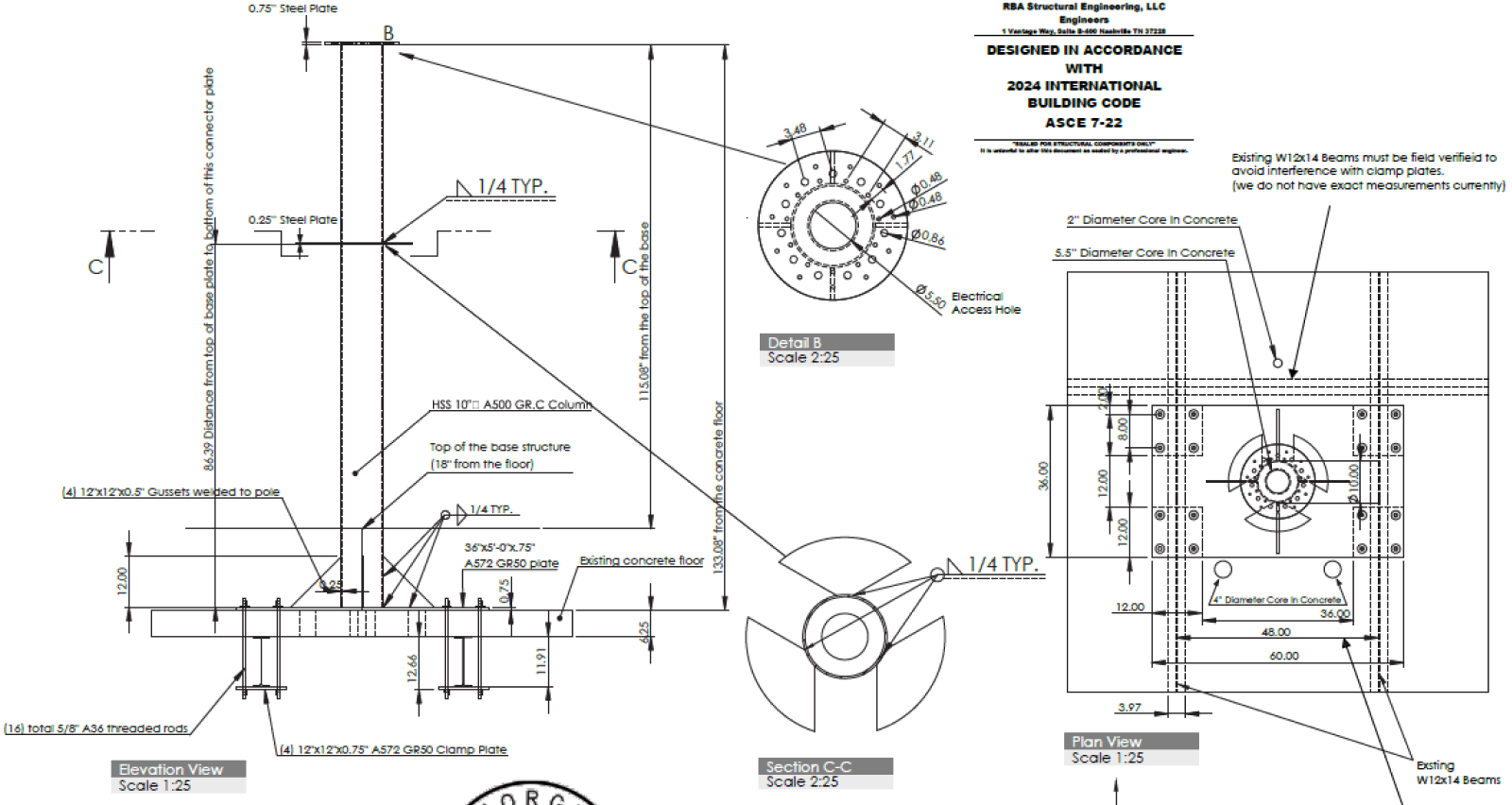
ARCHITECTURAL DRAWING SAMPLE


ENGINEERING REVIEW
Reviewed, stamped, and refined for the atrium.
An outside engineer reviewed the drawing package. Their feedback led to targeted structural changes—including additional steel connectors and bars below the atrium floor—without changing the experience’s core form.
The goal was not simply a convincing render. It was an approved system fabricators could build.
THE PRINCIPAL CONSTRAINTS
STRUCTURE
Weight + floor anchoring + engineered connectors
GEOMETRY
Sphere and pedestal proportions + internal access
SYSTEMS
Heat + power + cabling + speakers + sensors
PUBLIC SPACE
Passenger circulation + accessibility + airport access
DELIVERY
Installation window + approval process
04 / CONTENT ARCHITECTURE
Designing for a canvas
with no edges.
Spherical media is authored as a 2:1 equirectangular canvas, then wrapped around the globe. That translation introduces its own rules: visible seams, severe pole distortion, and motion that behaves differently from a flat display.

FLAT SOURCE CANVAS / 2:1 EQUIRECTANGULAR FORMAT

WRAPPED SPHERE / EXAMPLE
POLES
Keep critical type and logos away from the top and bottom, where distortion compresses the image.
SEAM
Design the left and right edges to meet cleanly so the wrap does not reveal an abrupt break.
MOTION
Moving content must respect the sphere’s mapped axis; standard flat-screen animation rules do not directly transfer.
The sphere creates spectacle.
The pillars create clarity.
The sphere and three supporting pillars can run as separate canvases or synchronize into a coordinated composition. The sphere delivers the visual moment; the pillars hold detailed, readable supporting content closer to eye level.
SPHERE
SPECTACLE
PILLAR 01
DETAIL
PILLAR 02
DETAIL
PILLAR 03
DETAIL
05 / PROTOTYPING + SYSTEM TESTING
Testing the pipeline before going live.
The small office sphere became a controlled test environment. It showed how 2:1 source media wrapped in three dimensions, exposed distortion before publishing, and allowed us to troubleshoot without placing unfinished work on the public installation.

UV MAPPING IN BLENDER
DESIGNER-LED QA
Testing the experience end to end.
Formal passenger usability testing was outside the project scope. Instead, I led hands-on technical validation across the full experience, using each test cycle to identify playback, distortion, sensing, and integration issues before and during launch.
Content mapping + seam behavior
Small-sphere distortion checks
Studio DX playback workflow
Motion-sensor response
360° audio playback
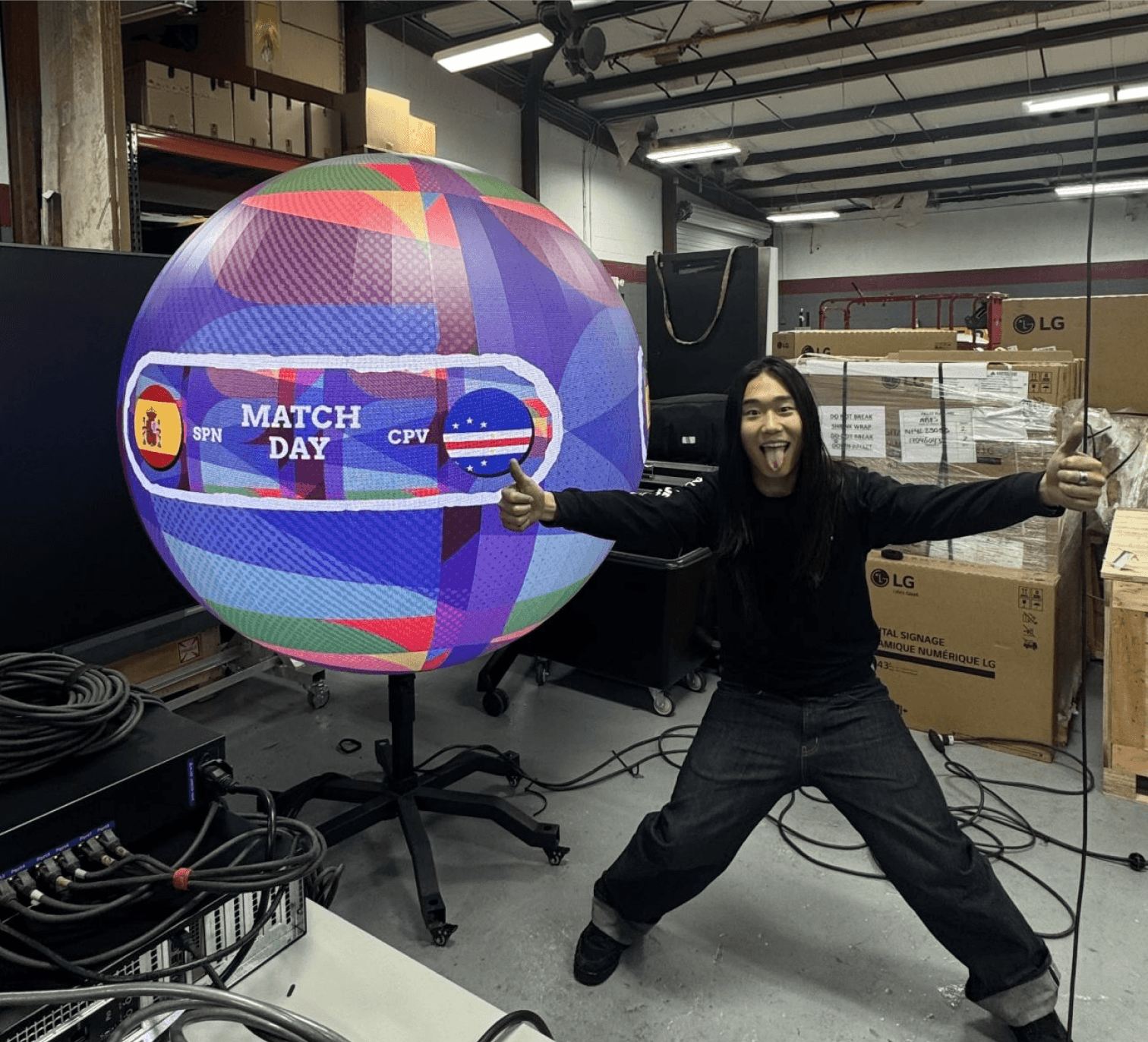

CONTENT TESTING IN THE OFFICE

FOUR-CAMERA MOTION-SENSOR RESPONSE TEST
06 / INTEGRATED TECHNOLOGY
Designing the system inside the spectacle.
I designed the seating and internal technology housing, coordinating service access, cabling, speakers, sensors, and the relationship between the sphere and its supporting pillars.

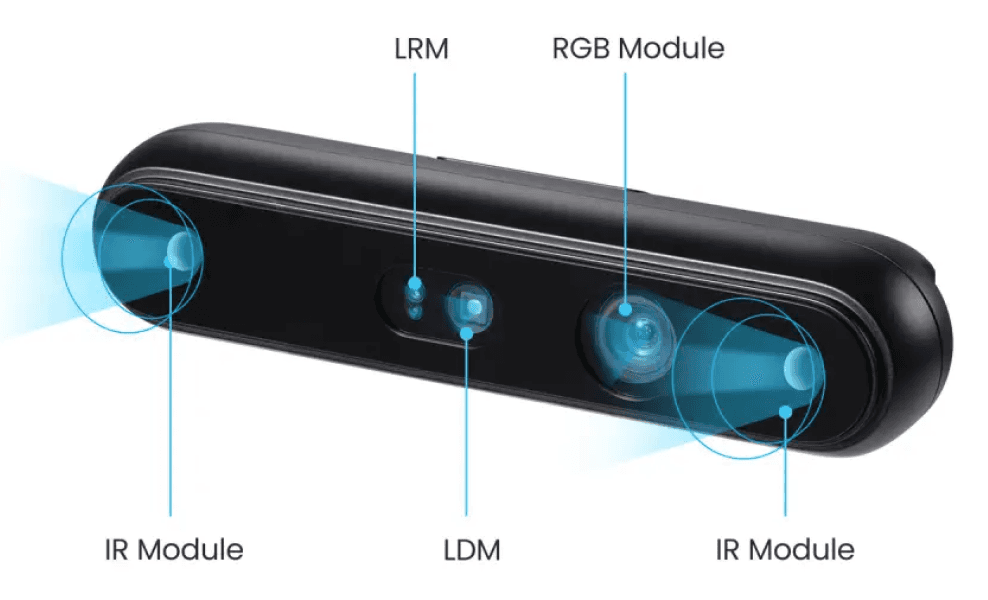
MOTION SENSING
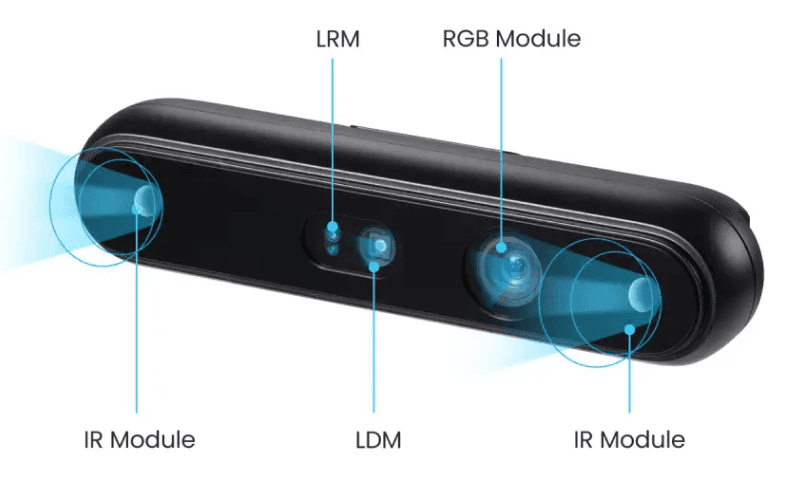
Six Gemini 336L sensors—two above each curved display—for full 360° coverage.


VOICE INPUT
Three Shure MXA710 linear-array microphones integrated into the system.


DIRECTIONAL AUDIO
Three VERTUS CLA 204T speakers—one housed within each fin—plus one CLA 208SA subwoofer.
FUTURE-READY
Motion sensing is installed and tested. Public interactive experiences remain a future capability pending airport approval.
07 / FABRICATION + DEPLOYMENT
Protecting the design through every handoff.
I coordinated with fabricators, engineers, technology vendors, airport stakeholders, and Capital Signs leadership to translate the approved package into a working installation. I reviewed instructions, answered production questions, and visited the site to verify that construction remained aligned with the design intent.
01

SHOP
FABRICATION

02
LED ASSEMBLY
03
AIRPORT INTEGRATION

DESIGN PACKAGE
ENGINEERING
FABRICATION
INTEGRATION
LAUNCH
08 / TRAINING + HANDOFF
Teaching the airport team to design for the sphere.
After launch, the airport’s graphic design team came to the Capital Signs office for an in-person training session. I created the curriculum, led the presentation, demonstrated the content workflow, and answered questions about both the display format and the installed technology.
FORMAT
In person / Capital Signs office / Airport graphic design team / Presentation + live Q&A
SESSION SCOPE
From flat canvas to installed system.
01
2:1 equirectangular setup
02
Seams, poles, and safe zones
03
Sphere + pillar canvas logic
04
Studio DX publishing workflow
05
Sensors, microphones, and audio
Training focused on platform literacy, content requirements, and clear collaboration with the Capital Signs production team.

EQUIRECTANGULAR GRID
How a flat 2:1 canvas wraps around the sphere.

SAFE ZONES
Where critical content can remain legible.


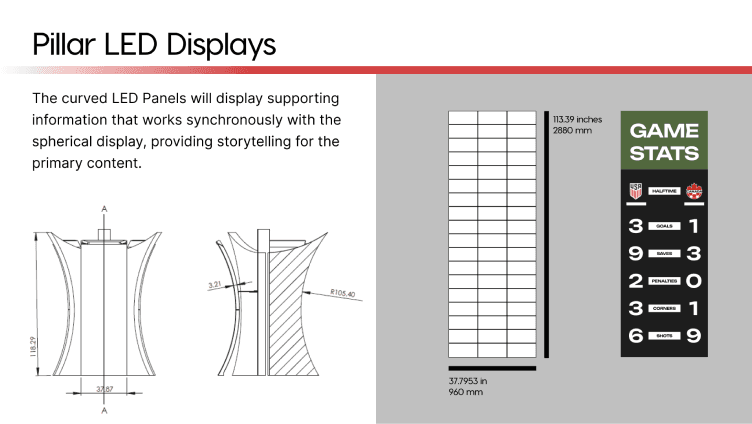
SYSTEM DETAIL
How installed hardware supports future experiences.
09 / NEXT PHASE — PLANNED
NOT YET DEVELOPED
Bringing flight context into the ATLAS canvas.
ATL selected a streamlined Flight Information Display System (FIDS) experience as ATLAS’s next content phase. The sphere will visualize routes based on real flight data, while the pillars will show essential departure and arrival details. I will design the pillar experience and manage implementation—coordinating with Acquire, tracking progress, troubleshooting issues, testing the completed system, and overseeing delivery.

EDITABLE CONCEPT DIAGRAM / NOT FINAL UI
SIMULATED FLIGHT-PATH VISUAL — SUBJECT TO CHANGE
DEPARTURES
LOS ANGELES
DL 4041 7:00 E27
NEW YORK
DL 4041 7:00 E27
BOSTON
DL 4041 7:00 E27
DALLAS
DL 4041 7:00 E27
CHICAGO
DL 4041 7:00 E27
FLIGHT INFORMATION
LOS ANGELES, CA
Time
Gate


CNCLD
NEW YORK, NY
Time
Gate
BOSTON, MA
Time
Gate
DLYD
DALLAS, TX
Time
Gate


Flights leaving ATL within the next 3 hours
Departures
SELECTED EXPERIENCE / FLIGHT INFORMATION
Two connected outputs.
01
SPHERE
A stylized flight-path visualization generated from current departure data.
02
PILLARS
A simplified departures and arrivals display showing destination, airline, flight number, time, and gate, with a QR code for more information.
MY NEXT RESPONSIBILITY
manage implementation through testing and delivery.
10 / CONTENT COLLABORATION
Scaling the creative team for launch.
ATLAS needed a launch content library built for an unconventional spherical canvas. I recommended Gryphon Coovadia to Capital Signs, which contracted him for the motion work. As the production scope grew, Gryphon brought in Miguel Vera to help deliver the launch package.
MY ROLE
Turning a specialized display into a usable creative workflow.
Working alongside our Content Director, Celia Hicks, who managed content production, we taught the designers how to build equirectangular content and translated ATLAS’s technical constraints into practical guidance.
01
Talent recommendation
02
8K format, safe-zone + mapping specifications
03
Helix + Journey asset creation
04
Motion, distortion + seam feedback
05
Display review + launch testing
LAUNCH CONTENT
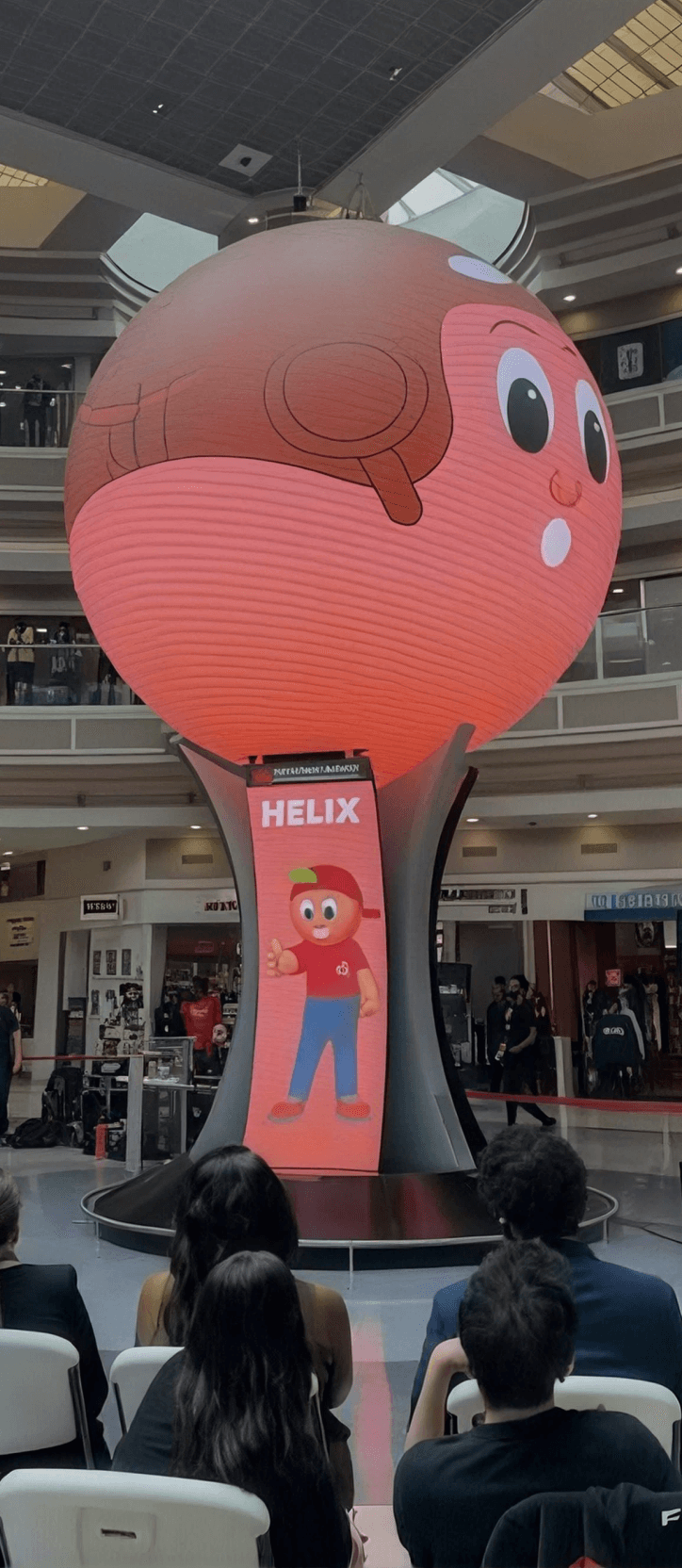

HELIX + JOURNEY
Launch animations featuring ATL’s mascots, built with original character assets I supplied.


GATES TO GOALS
Soccer-themed content for ATL’s campaign, created without using restricted FIFA branding.


ATL SKYPOINT
Motion content highlighting ATL Skypoint—the airport’s restaurants, retail, and concessions.
MOTION DESIGN TEAM
Capital Signs contracted Gryphon directly. Gryphon brought Miguel into the project to expand production capacity for launch.
Gryphon Coovadia
MOTION DESIGNER
Miguel Vera
MOTION DESIGNER
11 / LAUNCH + OUTCOME
A new media landmark in the world’s busiest airport.
ATLAS launched on June 2, 2026, as a permanent installation in the Domestic Terminal atrium. It gives ATL a high-visibility media platform today and a foundation for richer synchronized, reactive, and immersive experiences over time.

JUNE 2, 2026
Official launch
CUSTOM MEDIA SYSTEM
A 15-foot LED sphere synchronized with three curved pillar displays
PERMANENT PLATFORM
Built for evolving content and future interaction
12 / REFLECTION
SELECTED COLLABORATORS
ORIGINATING CONCEPT
Andy Panos
VENDOR COORDINATION
Don Leonard
FABRICATION + ENGINEERING
Henry Wiggins + project partners
LAUNCH MOTION DESIGN
Gryphon Coovadia + Miguel Vera
CLIENT + AIRPORT STAKEHOLDERS
Hartsfield-Jackson Atlanta International Airport
FINAL MEDIA DIRECTION
Celia Hicks
CONTENT PLATFORM
Acquire Digital / Studio DX
The value was in bridging disciplines.
ATLAS required me to move continuously between client communication, experience design, architectural documentation, fabrication, media production, and deployment. The project strengthened my ability to learn unfamiliar tools quickly, make technical decisions visible, and keep a complex physical-digital system coherent across many specialist handoffs.
SOLIDWORKS
Built an architectural CAD workflow from scratch under a live project deadline.
SPHERICAL MEDIA
Developed and tested equirectangular content, safe zones, seams, and motion behavior.
SYSTEMS THINKING
Connected physical form, installed technology, content operations, and future interaction.
04 / CONTENT ARCHITECTURE
Designing for a canvas
with no edges.
Spherical media is authored as a 2:1 equirectangular canvas, then wrapped around the globe. That translation introduces its own rules: visible seams, severe pole distortion, and motion that behaves differently from a flat display.
FLAT SOURCE CANVAS / 2:1 EQUIRECTANGULAR FORMAT
WRAPPED SPHERE / EXAMPLE
POLES
Keep critical type and logos away from the top and bottom, where distortion compresses the image.
SEAM
Design the left and right edges to meet cleanly so the wrap does not reveal an abrupt break.
MOTION
Moving content must respect the sphere’s mapped axis; standard flat-screen animation rules do not directly transfer.
The sphere creates spectacle.
The pillars create clarity.
The sphere and three supporting pillars can run as separate canvases or synchronize into a coordinated composition. The sphere delivers the visual moment; the pillars hold detailed, readable supporting content closer to eye level.
SPHERE
SPECTACLE
PILLAR 01
DETAIL
PILLAR 02
DETAIL
PILLAR 03
DETAIL
05 / PROTOTYPING + SYSTEM TESTING
Testing the pipeline before going live.
The small office sphere became a controlled test environment. It showed how 2:1 source media wrapped in three dimensions, exposed distortion before publishing, and allowed us to troubleshoot without placing unfinished work on the public installation.

UV MAPPING IN BLENDER
DESIGNER-LED QA
Testing the experience end to end.
Formal passenger usability testing was outside the project scope. Instead, I led hands-on technical validation across the full experience, using each test cycle to identify playback, distortion, sensing, and integration issues before and during launch.
Content mapping + seam behavior
Small-sphere distortion checks
Studio DX playback workflow
Motion-sensor response
360° audio playback


CONTENT TESTING IN THE OFFICE

FOUR-CAMERA MOTION-SENSOR RESPONSE TEST
06 / INTEGRATED TECHNOLOGY
Designing the system inside the spectacle.
I designed the seating and internal technology housing, coordinating service access, cabling, speakers, sensors, and the relationship between the sphere and its supporting pillars.

MOTION SENSING
Six Gemini 336L sensors—two above each curved display—for full 360° coverage.

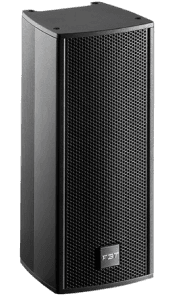
DIRECTIONAL AUDIO
Three VERTUS CLA 204T speakers—one housed within each fin—plus one CLA 208SA subwoofer.
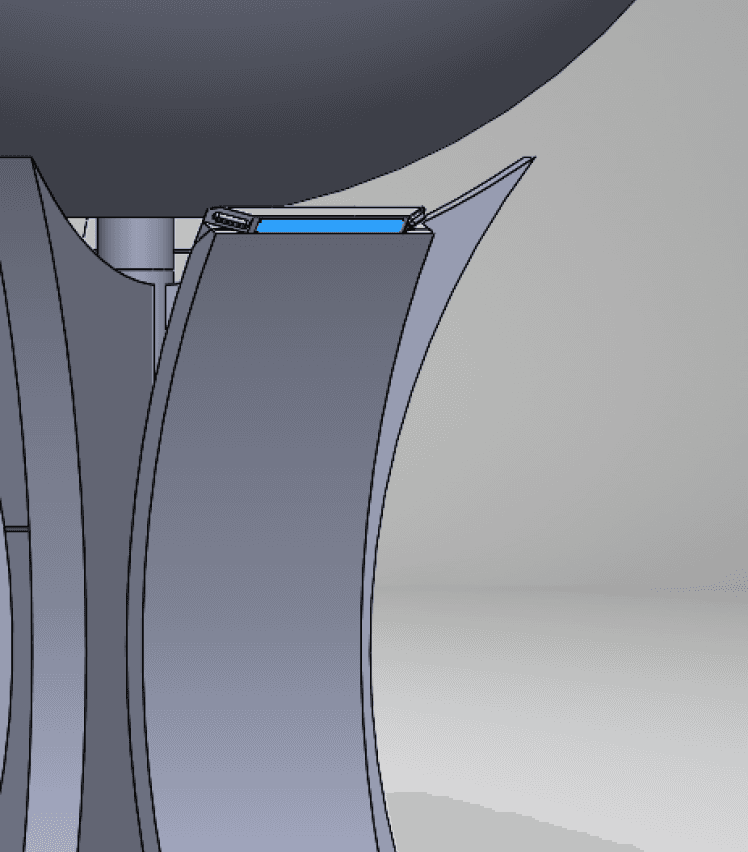
VOICE INPUT
Three Shure MXA710 linear-array microphones integrated into the system.
FUTURE-READY
Motion sensing is installed and tested. Public interactive experiences remain a future capability pending airport approval.
DESIGN PACKAGE
ENGINEERING
FABRICATION
INTEGRATION
LAUNCH
01

SHOP
FABRICATION
02
LED ASSEMBLY
03
AIRPORT INTEGRATION

Protecting the design through every handoff.
I coordinated with fabricators, engineers, technology vendors, airport stakeholders, and Capital Signs leadership to translate the approved package into a working installation. I reviewed instructions, answered production questions, and visited the site to verify that construction remained aligned with the design intent.
07 / FABRICATION + DEPLOYMENT
08 / TRAINING + HANDOFF
Teaching the airport team to design for the sphere.
After launch, the airport’s graphic design team came to the Capital Signs office for an in-person training session. I created the curriculum, led the presentation, demonstrated the content workflow, and answered questions about both the display format and the installed technology.
SESSION SCOPE
From flat canvas to installed system.
01
2:1 equirectangular setup
02
Seams, poles, and safe zones
03
Sphere + pillar canvas logic
04
Studio DX publishing workflow
05
Sensors, microphones, and audio
Training focused on platform literacy, content requirements, and clear collaboration with the Capital Signs production team.
EQUIRECTANGULAR GRID
How a flat 2:1 canvas wraps around the sphere.

SAFE ZONES
Where critical content can remain legible.

SYSTEM DETAIL
How installed hardware supports future experiences.
FORMAT
In person / Capital Signs office / Airport graphic design team / Presentation + live Q&A
09 / NEXT PHASE — PLANNED
NOT YET DEVELOPED
Bringing flight context into the ATLAS canvas.
ATL selected a streamlined Flight Information Display System (FIDS) experience as ATLAS’s next content phase. The sphere will visualize routes based on real flight data, while the pillars will show essential departure and arrival details. I will design the pillar experience and manage implementation—coordinating with Acquire, tracking progress, troubleshooting issues, testing the completed system, and overseeing delivery.

EDITABLE CONCEPT DIAGRAM / NOT FINAL UI
SIMULATED FLIGHT-PATH VISUAL — SUBJECT TO CHANGE
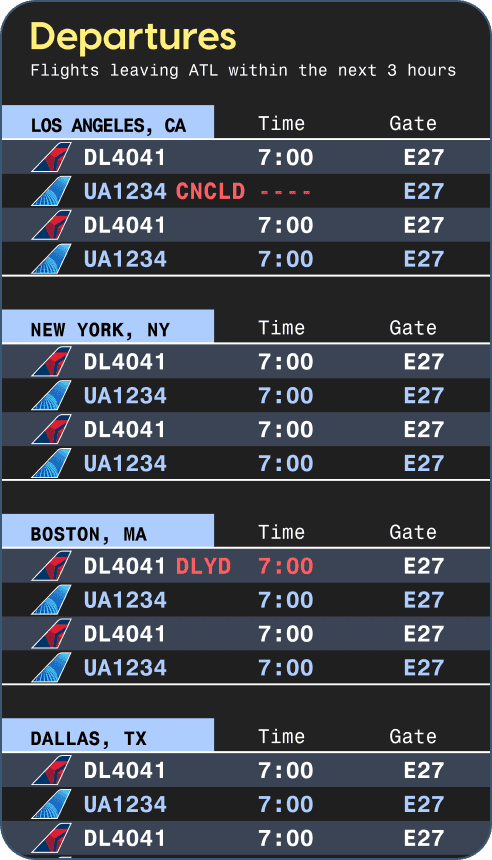
SELECTED EXPERIENCE / FLIGHT INFORMATION
Two connected outputs.
01
SPHERE
A stylized flight-path visualization generated from current departure data.
02
PILLARS
A simplified departures and arrivals display showing destination, airline, flight number, time, and gate, with a QR code for more information.
MY NEXT RESPONSIBILITY
manage implementation through testing and delivery.
10 / CONTENT COLLABORATION
Scaling the creative team for launch.
ATLAS needed a launch content library built for an unconventional spherical canvas. I recommended Gryphon Coovadia to Capital Signs, which contracted him for the motion work. As the production scope grew, Gryphon brought in Miguel Vera to help deliver the launch package.
MY ROLE
Turning a specialized display into a usable creative workflow.
Working alongside our Content Director, Celia Hicks, who managed content production, we taught the designers how to build equirectangular content and translated ATLAS’s technical constraints into practical guidance.
01
Talent recommendation
02
8K format, safe-zone + mapping specifications
03
Helix + Journey asset creation
04
Motion, distortion + seam feedback
05
Display review + launch testing
LAUNCH CONTENT
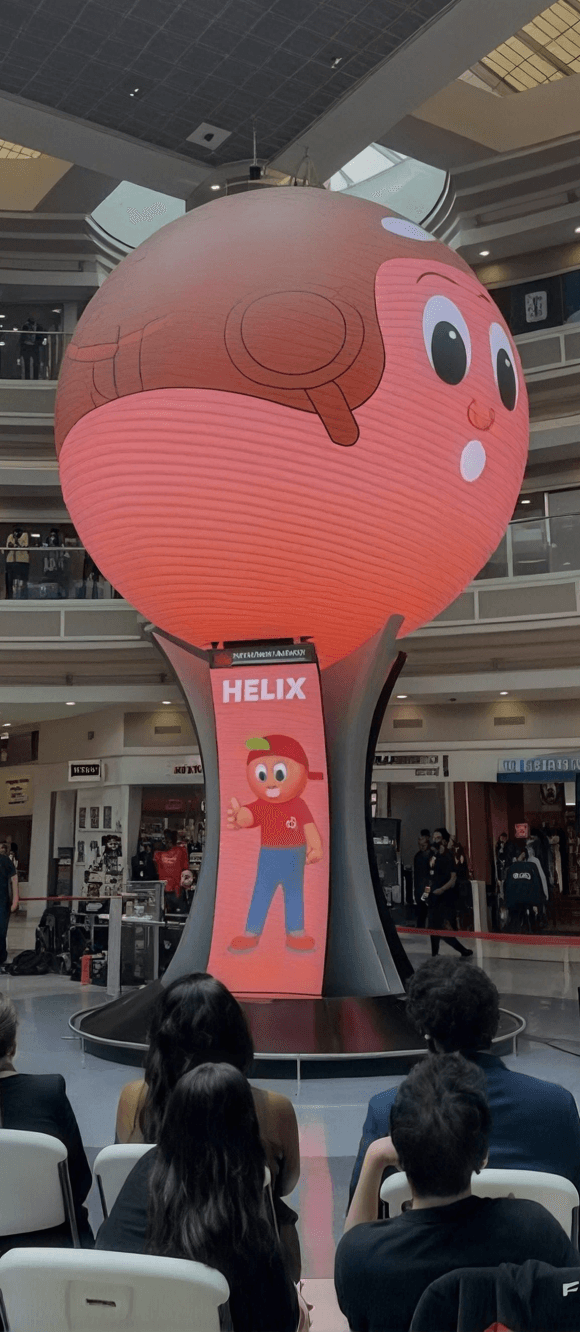

HELIX + JOURNEY
Launch animations featuring ATL’s mascots, built with original character assets I supplied.


GATES TO GOALS
Soccer-themed content for ATL’s campaign, created without using restricted FIFA branding.

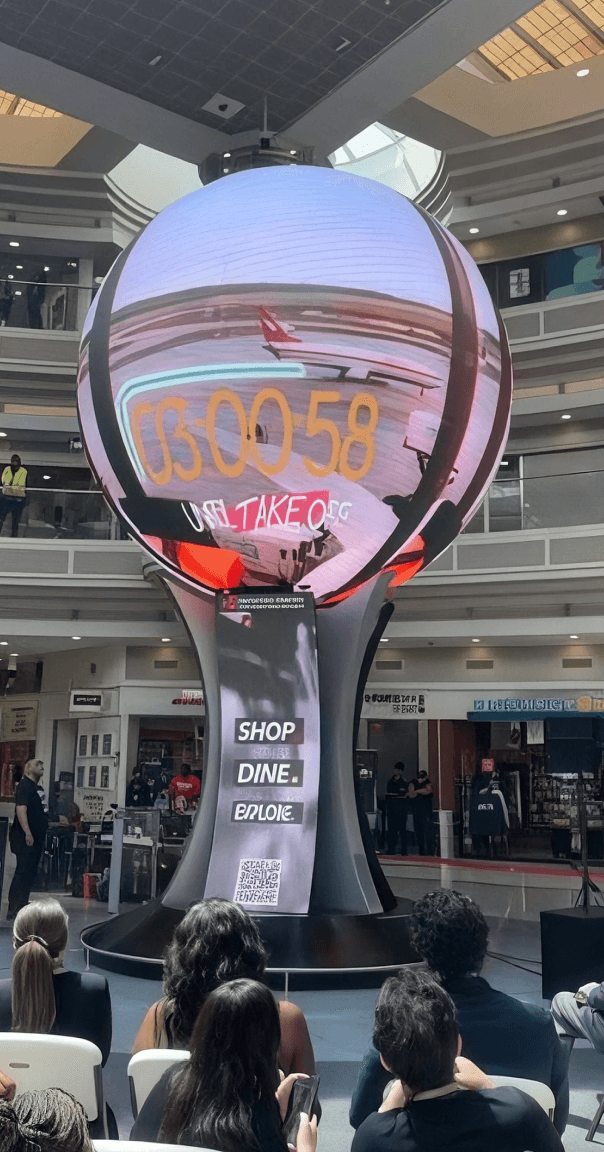
ATL SKYPOINT
Motion content highlighting ATL Skypoint—the airport’s restaurants, retail, and concessions.
MOTION DESIGN TEAM
Capital Signs contracted Gryphon directly. Gryphon brought Miguel into the project to expand production capacity for launch.
Gryphon Coovadia
MOTION DESIGNER
Miguel Vera
MOTION DESIGNER
11 / LAUNCH + OUTCOME
A new media landmark in the world’s busiest airport.
ATLAS launched on June 2, 2026, as a permanent installation in the Domestic Terminal atrium. It gives ATL a high-visibility media platform today and a foundation for richer synchronized, reactive, and immersive experiences over time.
JUNE 2, 2026
Official launch
CUSTOM MEDIA SYSTEM
A 15-foot LED sphere synchronized with three curved pillar displays
PERMANENT PLATFORM
Built for evolving content and future interaction
12 / REFLECTION
The value was in bridging disciplines.
ATLAS required me to move continuously between client communication, experience design, architectural documentation, fabrication, media production, and deployment. The project strengthened my ability to learn unfamiliar tools quickly, make technical decisions visible, and keep a complex physical-digital system coherent across many specialist handoffs.
SOLIDWORKS
Built an architectural CAD workflow from scratch under a live project deadline.
SPHERICAL MEDIA
Developed and tested equirectangular content, safe zones, seams, and motion behavior.
SYSTEMS THINKING
Connected physical form, installed technology, content operations, and future interaction.
SELECTED COLLABORATORS
ORIGINATING CONCEPT
Andy Panos
VENDOR COORDINATION
Don Leonard
FABRICATION + ENGINEERING
Henry Wiggins + project partners
LAUNCH MOTION DESIGN
Gryphon Coovadia + Miguel Vera
CLIENT + AIRPORT STAKEHOLDERS
Hartsfield-Jackson Atlanta International Airport
FINAL MEDIA DIRECTION
Celia Hicks
CONTENT PLATFORM
Acquire Digital / Studio DX

ANDREW YI / DIGITAL EXPERIENCE CASE STUDY
CAPITAL SIGNS × HARTSFIELD-JACKSON ATL
ATLAS
at ATL
ROLE
Project Design Lead + Digital Experience Project Manager
TIMELINE
December 2025 — June 2, 2026
Designing a 25-foot-tall immersive media landmark built around a 15-foot LED sphere for the world’s busiest airport.
ANDREW YI / DIGITAL EXPERIENCE CASE STUDY
CAPITAL SIGNS × HARTSFIELD-JACKSON ATL
ATLAS
at ATL
ROLE
Project Design Lead + Digital Experience Project Manager
TIMELINE
December 2025 — June 2, 2026
Designing a 25-foot-tall immersive media landmark built around a 15-foot LED sphere for the world’s busiest airport.
01 / OVERVIEW
Designing a Spectacle to Welcome Passengers
to Atlanta
Capital Signs was commissioned by Hartsfield-Jackson Atlanta International Airport to replace the atrium’s original 1993 clock tower with a new digital landmark.
The goal was to create an immersive welcome experience combining large-format media, synchronized playback, spatial audio, and future interaction.
THE SITE / DOMESTIC TERMINAL ATRIUM - LAUNCH DAY
MY ROLE
Project Design Lead + Digital Experience Project Manager
15 FT
LED SPHERE
10M+
PIXELS
8K
SYNCHRONIZED PLAYBACK
$3.26M
PUBLICLY REPORTED INSTALLATION
02 / THE PITCH
A Multidisciplinary Design Project
Building on the original concept of an LED sphere located in the atrium, I created the client-facing materials, from mockups and renderings to the final pitch presentation. I managed the project through design development, and architectural documentation.
LEARNING ON THE GO
I taught myself SolidWorks to create the production-ready drawing package, then learned Blender to produce the final 3D renders.
03 / ARCHITECTURE + ENGINEERING
Turning a digital concept into buildable architecture.
Using SolidWorks, I created the architectural models and drawing package used to communicate ATLAS’s form, internal technology housing, seating, and fabrication intent. Specialist partners produced the LED wiring and electrical diagrams.
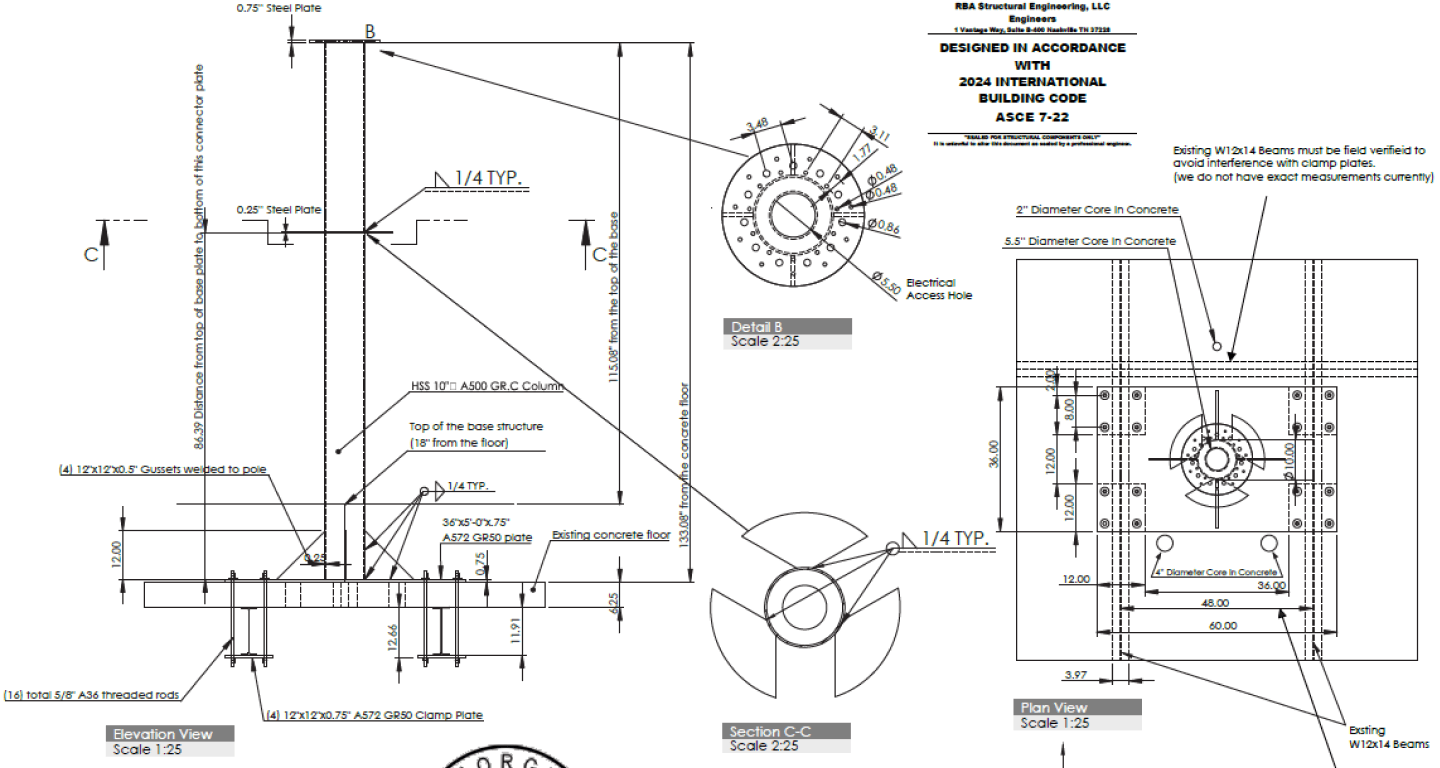
ARCHITECTURAL DRAWING SAMPLE

ENGINEERING REVIEW
Reviewed, and refined for the atrium.
An outside engineer reviewed the drawing package. Their feedback led to targeted structural changes—including additional steel connectors and bars below the atrium floor—without changing the experience’s core form.
The goal was not simply a convincing render. It was an approved system fabricators could build.
THE PRINCIPAL CONSTRAINTS
STRUCTURE
Weight + floor anchoring + engineered connectors
GEOMETRY
Sphere and pedestal proportions + internal access
SYSTEMS
Heat + power + cabling + speakers + sensors
PUBLIC SPACE
Passenger circulation + accessibility + airport access
DELIVERY
Installation window + approval process

TIMELINE
December 2025 — June 2, 2026
ROLE
Project Design Lead + Digital Experience Project Manager
ATLAS at ATL
Designing a 25-foot-tall immersive media landmark built around a 15-foot LED sphere for the world’s busiest airport.
ANDREW YI / DIGITAL EXPERIENCE CASE STUDY
CAPITAL SIGNS × HARTSFIELD-JACKSON ATL
01 / OVERVIEW
Designing a Spectacle to Welcome Passengers
to Atlanta
Capital Signs was commissioned by Hartsfield-Jackson Atlanta International Airport to replace the atrium’s original 1993 clock tower with a new digital landmark.
The goal was to create an immersive welcome experience combining large-format media, synchronized playback, spatial audio, and future interaction.
THE SITE / DOMESTIC TERMINAL ATRIUM - LAUNCH DAY
MY ROLE
Project Design Lead + Digital Experience Project Manager
15 FT
LED SPHERE
10M+
PIXELS
8K
SYNCHRONIZED PLAYBACK
$3.26M
PUBLICLY REPORTED INSTALLATION
02 / THE PITCH
A Multidisciplinary Design Project
Building on the original concept of an LED sphere located in the atrium, I created the client-facing materials, from mockups and renderings to the final pitch presentation. I managed the project through design development, and architectural documentation.
LEARNING ON THE GO
I taught myself SolidWorks to create the production-ready drawing package, then learned Blender to produce the final 3D renders.
03 / ARCHITECTURE + ENGINEERING
Turning a digital concept into buildable architecture.
Using SolidWorks, I created the architectural models and drawing package used to communicate ATLAS’s form, internal technology housing, seating, and fabrication intent. Specialist partners produced the LED wiring and electrical diagrams.

ARCHITECTURAL DRAWING SAMPLE
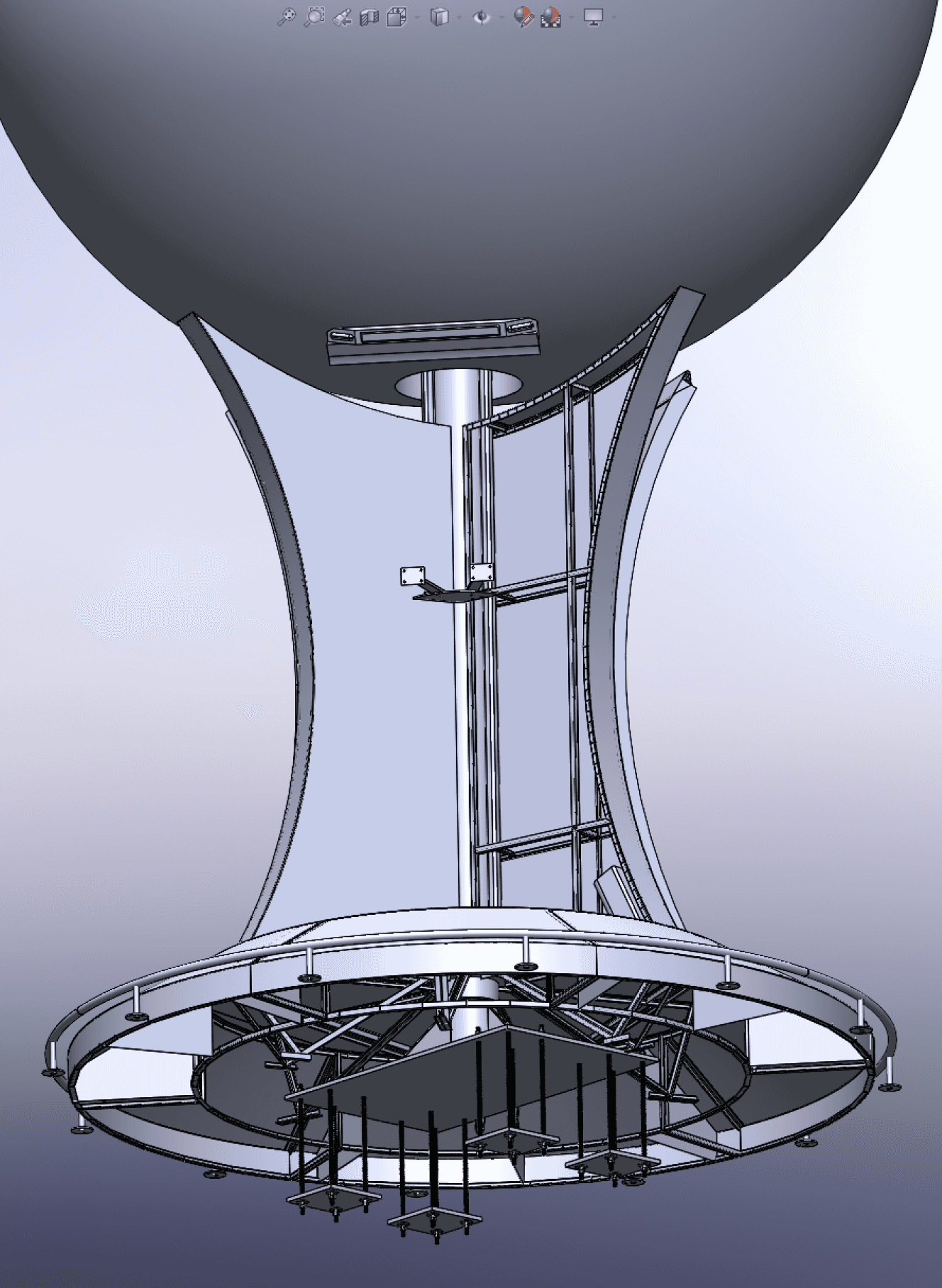
ENGINEERING REVIEW
Reviewed, stamped, and refined for the atrium.
An outside engineer reviewed the drawing package. Their feedback led to targeted structural changes—including additional steel connectors and bars below the atrium floor—without changing the experience’s core form.
The goal was not simply a convincing render. It was an approved system fabricators could build.
THE PRINCIPAL CONSTRAINTS
STRUCTURE
Weight + floor anchoring + engineered connectors
GEOMETRY
Sphere and pedestal proportions + internal access
SYSTEMS
Heat + power + cabling + speakers + sensors
PUBLIC SPACE
Passenger circulation + accessibility + airport access
DELIVERY
Installation window + approval process
04 / CONTENT ARCHITECTURE
Designing for a canvas
with no edges.
Spherical media is authored as a 2:1 equirectangular canvas, then wrapped around the globe. That translation introduces its own rules: visible seams, severe pole distortion, and motion that behaves differently from a flat display.
FLAT SOURCE CANVAS / 2:1 EQUIRECTANGULAR FORMAT
WRAPPED SPHERE / EXAMPLE
POLES
Keep critical type and logos away from the top and bottom, where distortion compresses the image.
SEAM
Design the left and right edges to meet cleanly so the wrap does not reveal an abrupt break.
MOTION
Moving content must respect the sphere’s mapped axis; standard flat-screen animation rules do not directly transfer.
The sphere creates spectacle.
The pillars create clarity.
The sphere and three supporting pillars can run as separate canvases or synchronize into a coordinated composition. The sphere delivers the visual moment; the pillars hold detailed, readable supporting content closer to eye level.
SPHERE
SPECTACLE
PILLAR 01
DETAIL
PILLAR 02
DETAIL
PILLAR 03
DETAIL
05 / PROTOTYPING + SYSTEM TESTING
Testing the pipeline before going live.
The small office sphere became a controlled test environment. It showed how 2:1 source media wrapped in three dimensions, exposed distortion before publishing, and allowed us to troubleshoot without placing unfinished work on the public installation.

UV MAPPING IN BLENDER
DESIGNER-LED QA
Testing the experience end to end.
Formal passenger usability testing was outside the project scope. Instead, I led hands-on technical validation across the full experience, using each test cycle to identify playback, distortion, sensing, and integration issues before and during launch.
Content mapping + seam behavior
Small-sphere distortion checks
Studio DX playback workflow
Motion-sensor response
360° audio playback


CONTENT TESTING IN THE OFFICE

FOUR-CAMERA MOTION-SENSOR RESPONSE TEST
06 / INTEGRATED TECHNOLOGY
Designing the system inside the spectacle.
I designed the seating and internal technology housing, coordinating service access, cabling, speakers, sensors, and the relationship between the sphere and its supporting pillars.
MOTION SENSING
Six Gemini 336L sensors—two above each curved display—for full 360° coverage.

VOICE INPUT
Three Shure MXA710 linear-array microphones integrated into the system.


DIRECTIONAL AUDIO
Three VERTUS CLA 204T speakers—one housed within each fin—plus one CLA 208SA subwoofer.
FUTURE-READY
Motion sensing is installed and tested. Public interactive experiences remain a future capability pending airport approval.
07 / FABRICATION + DEPLOYMENT
Protecting the design through every handoff.
I coordinated with fabricators, engineers, technology vendors, airport stakeholders, and Capital Signs leadership to translate the approved package into a working installation. I reviewed instructions, answered production questions, and visited the site to verify that construction remained aligned with the design intent.
01
SHOP FABRICATION
02
LED ASSEMBLY
03
AIRPORT INTEGRATION
01 DESIGN PACKAGE
02 ENGINEERING
03 FABRICATION
04 INTEGRATION
05 LAUNCH
08 / TRAINING + HANDOFF
Teaching the airport team to design for the sphere.
After launch, the airport’s graphic design team came to the Capital Signs office for an in-person training session. I created the curriculum, led the presentation, demonstrated the content workflow, and answered questions about both the display format and the installed technology.
SESSION SCOPE
From flat canvas to installed system.
01
2:1 equirectangular setup
02
Seams, poles, and safe zones
03
Sphere + pillar canvas logic
04
Studio DX publishing workflow
05
Sensors, microphones, and audio
Training focused on platform literacy, content requirements, and clear collaboration with the Capital Signs production team.
FORMAT
In person / Capital Signs office / Airport graphic design team / Presentation + live Q&A
EQUIRECTANGULAR GRID
How a flat 2:1 canvas wraps around the sphere.
SAFE ZONES
Where critical content can remain legible.
SYSTEM DETAIL
How installed hardware supports future experiences.
09 / NEXT PHASE — PLANNED
NOT YET DEVELOPED
Bringing flight context into the ATLAS canvas.
ATL selected a streamlined Flight Information Display System (FIDS) experience as ATLAS’s next content phase. The sphere will visualize routes based on real flight data, while the pillars will show essential departure and arrival details. I will design the pillar experience and manage implementation—coordinating with Acquire, tracking progress, troubleshooting issues, testing the completed system, and overseeing delivery.

EDITABLE CONCEPT DIAGRAM / NOT FINAL UI
SIMULATED FLIGHT-PATH VISUAL — SUBJECT TO CHANGE
SELECTED EXPERIENCE / FLIGHT INFORMATION
Two connected outputs.
01
SPHERE
A stylized flight-path visualization generated from current departure data.
02
PILLARS
A simplified departures and arrivals display showing destination, airline, flight number, time, and gate, with a QR code for more information.
MY NEXT RESPONSIBILITY
manage implementation through testing and delivery.
10 / CONTENT COLLABORATION
Scaling the creative team for launch.
ATLAS needed a launch content library built for an unconventional spherical canvas. I recommended Gryphon Coovadia to Capital Signs, which contracted him for the motion work. Gryphon brought in Miguel Vera to help deliver the launch package.
MY ROLE
Turning a specialized display into a usable creative workflow.
Working alongside our Content Director, Celia Hicks, who managed content production, we taught the designers how to build equirectangular content and translated ATLAS’s technical constraints into practical guidance.
01
Talent recommendation
02
8K format, safe-zone + mapping specifications
03
Helix + Journey asset creation
04
Motion, distortion + seam feedback
05
Display review + launch testing
LAUNCH CONTENT
HELIX + JOURNEY
Launch animations featuring ATL’s mascots, built with original character assets I supplied.
GATES TO GOALS
Soccer-themed content for ATL’s campaign, created without using restricted FIFA branding.
ATL SKYPOINT
Motion content highlighting ATL Skypoint—the airport’s restaurants, retail, and concessions.
MOTION DESIGN TEAM
Capital Signs contracted Gryphon directly. Gryphon brought Miguel into the project to expand production capacity for launch.
Gryphon Coovadia
MOTION DESIGNER
Miguel Vera
MOTION DESIGNER
11 / LAUNCH + OUTCOME
A new media landmark in the world’s busiest airport.
ATLAS launched on June 2, 2026, as a permanent installation in the Domestic Terminal atrium. It gives ATL a high-visibility media platform today and a foundation for richer synchronized, reactive, and immersive experiences over time.
JUNE 2, 2026
Official launch
CUSTOM MEDIA SYSTEM
A 15-foot LED sphere synchronized with three curved pillar displays
PERMANENT PLATFORM
Built for evolving content and future interaction
12 / REFLECTION
The value was in bridging disciplines.
ATLAS required me to move continuously between client communication, experience design, architectural documentation, fabrication, media production, and deployment. The project strengthened my ability to learn unfamiliar tools quickly, make technical decisions visible, and keep a complex physical-digital system coherent across many specialist handoffs.
SOLIDWORKS
Built an architectural CAD workflow from scratch under a live project deadline.
SPHERICAL MEDIA
Developed and tested equirectangular content, safe zones, seams, and motion behavior.
SYSTEMS THINKING
Connected physical form, installed technology, content operations, and future interaction.
SELECTED COLLABORATORS
ORIGINATING CONCEPT
Andy Panos
VENDOR COORDINATION
Don Leonard
FABRICATION + ENGINEERING
Henry Wiggins + project partners
LAUNCH MOTION DESIGN
Gryphon Coovadia + Miguel Vera
CLIENT + AIRPORT STAKEHOLDERS
Hartsfield-Jackson Atlanta International Airport
FINAL MEDIA DIRECTION
Celia Hicks
CONTENT PLATFORM
Acquire Digital / Studio DX
ATLANTA, GA · 2026